01 · Websites & WordPress
Websites that load fast and sell harder.
Fast WordPress or custom sites, designed to convert.
- UI/UX
- WordPress
- WooCommerce
SEO, websites, mobile apps and marketing for growing businesses. Run by AI agents, checked by our team, and set up in your name.
Need something we don’t list? We’ll build it custom, around your business.
One card for each service, each showing the real screen our agents work in. See every service →
Fast WordPress or custom sites, designed to convert.
Brand films, product demos, social cuts and voice, made on a pipeline.
Autopilot SEO, 24/7, 365 days a year. Technical, on-page and off-page, fully automated.
Replaces your traditional SEO agency and an in-house SEO hire. Backlinks from DR 30+ sites, built every month.
Native iOS and Android apps, shipped to both stores.
Social media, video making and campaigns planned, made, published and tracked.
Lead generation, LinkedIn outreach, follow-ups and a CRM that updates itself.
Invoicing, payment chasing, bookkeeping and cash reports, done by agents.
Trained on your business. Answers questions, takes bookings and passes hot leads to your team.
Six steps. You always know what happens next, and what it costs.
Rough notes are fine. Tell us the job, or talk it through on a call.
Scope, timeline and price in writing, built around your brief.
Website, CRM, ads, inbox and analytics. We keep what works and tell you what doesn't.
No automation for the sake of it. If a person does a job better, we say so.
A handover document and step-by-step guides, so your team can run it.
We stay on after launch to fix, tune and answer questions at no cost.
Type the salary you would pay. We show the yearly cost of hiring next to the cost of Cadral doing the job.
Not a logo wall. This is what actually runs your systems, what each piece is for, and who pays for it.


Umar has brought real value to LP Exchange by helping us utilise AI effectively across the business. He has strong technical knowledge, but importantly, he understands how to apply it in a practical and commercially useful way. His work has supported improvements across data cleansing, process automation, marketing and sales reporting, helping us turn complex information into clearer insights and more efficient ways of working.
Automation specialists working with growing businesses, in the UK and remotely. Our agents do the routine work; our people design it, check it and stay on call.
Bring one task your team repeats every week. Leave with a plan and a written proposal.
Twelve services, one team of agents. Pick one to start. Each job runs in your accounts and is handed over with full documentation.
Climb Google every month, on autopilot.
Technical · On-page · Off-pageExplore →02yourfirm.co.ukLiveSpeed checkedWebsitesSites that bring enquiries in.
WordPress · Custom · WooCommerceExplore →03Salon Book★ 4.9App Store · Google PlayMobile appsNative on iPhone and Android.
iOS · Android · Store launchExplore →04This week7 posts18,400 reachedMarketingEvery post, video and campaign on time.
Social · Video · CampaignsExplore →05Northfield GymCall bookedTue 10:00Sales and CRMEvery lead found, followed up, booked.
Email · LinkedIn · CRMExplore →06WhatsApp · 23:412s replyBooked Sat 11:00Customer serviceEvery call and message answered, 24/7.
Chat · WhatsApp · PhoneExplore →07INV-1044 · Penn DentalPaid£540 chasedOperations and financePaperwork and invoices done for you.
Onboarding · Invoices · ReportsExplore →08“Who hasn’t paid?”2 clientsReminder draftedAI workspaceRun the business from one chat window.
Claude · ChatGPT · GeminiExplore →Autopilot SEO, 24/7, 365 days a year. Technical, on-page and off-page, run by our agents and checked by a specialist. It replaces your SEO agency and an in-house hire.
Also in SEO:AEO and GEO, for AI answers →AI search optimisation in Manchester →
Designed and built in WordPress or custom code, and connected to your CRM from day one.
A site designed around one clear call to action on every page.
Pages and shops your team can edit without calling us.
Fast, custom-coded sites when you need more than a template.
Page speed, schema and local SEO before launch.
Give us the brief. Our agents plan, design and build the app, and we launch it on both stores in your name.
Social media, video making and campaigns planned, made, published and tracked by agents, in your voice.
InstagramSpring is boiler seasonMon 9:00
LinkedInWhy we service in AprilTue 8:30
ReelEngineer at work, 30 secondsWed 18:00
Email20% off ends SundayThu 10:00
FacebookBook before the rushFri 12:00
Script, edit and captions from one brief.
Lead generation, LinkedIn outreach, follow-ups and a CRM that updates itself. Your team only talks to people ready to buy.
Bright DentalWebsite · £2,450
Oak and CoSEO · £600/mo
Lumen ClinicApp · £8,000
Kite LegalLinkedIn · replied
Mill StudioEmail 2 of 3 sent
Northfield GymTue 10:00 · score 86
Harbour CafeThu 14:30
Penn DentalSigned · £3,200
Replied to Bright Dental in 1:42
LinkedIn invite accepted · Kite Legal
Email 2 sent to Mill Studio
Call booked · Northfield Gym
CRM cleaned · 12 duplicates merged
An AI assistant trained on your business answers on your website, WhatsApp and phone, books appointments and passes anything unusual to your team.
Hi, do you have anything free Saturday morning?
Hi Sara! Yes, 9:30 or 11:00 on Saturday. Which suits you?
11 please
Booked for Sat 11:00 ✓ You will get a reminder the day before.
Deposit £20 · Pay now
Onboarding, documents, scheduling and the Monday report, all on autopilot.
Automate my operations →Invoices out on time, late payers chased politely, cash report every Friday.
Automate my finance →Claude or ChatGPT connected to your CRM, inbox, invoices and files, plus training so your team uses it properly.
Two clients are late: Mill Studio (£860, reminder sent Monday) and Penn Dental (£540, due today). I have drafted a friendly reminder for Penn Dental. Send it now?
Book a free call and we'll tell you which job to automate first.
Book a free call →Pick a department. See what we stop, what runs instead, and work out what it's costing you now.
No day rates and no surprises. You get a written proposal before anything starts, and a full handover at the end.
Write it down or talk it through on a 20-minute call. Tell us what takes too long, what keeps slipping, and which tools you use.
We read the brief properly and send back a written proposal: what we'll build, what we won't, the timeline and the price.
With your go-ahead we look through your website, CRM, ads, inbox, analytics and files. Anything that already works well, we recommend you keep.
We automate where it clearly saves time or money. If a job is better done by a person, we tell you and leave it alone.
You get a handover document that explains every part of the system, plus step-by-step SOPs your team can follow.
We stay on for 30 days after launch at no cost. After that you can keep us on monthly, or run it yourself.
No. We connect to the business tools you already have, like your CRM, inbox and website. The software and AI usage are billed to your own accounts, listed before you commit, so nothing switches off if we stop working together. If something is genuinely holding you back, we'll explain why and suggest an alternative.
You do. Accounts, code, data and logins are set up in your name from day one. If we stop working together, nothing breaks.
Most first projects are live within two to three weeks of the proposal being approved.
You can run it yourself using the handover pack and SOPs, or keep us on monthly to monitor, fix and add new automations. Either side can stop with 30 days' notice.
Agents only handle the jobs we agree, inside clear rules. Anything unusual is passed to a person. You can read a log of everything they did.
Yes. We work remotely with clients around the world.
Twenty minutes and a written proposal within 48 hours.
Book twenty minutes →Free tools built from the questions clients ask us most. No sign-up, and the full breakdown sent to your inbox if you want it.
AI is our bread and butter. We guide you end to end, we stay up to date so you don't have to, and our specialists cost less than any of the alternatives.
We don't bolt AI on. Every service we sell runs through our own agents, every day, on real client work.
From the first brief to the handover document and SOPs, one team walks you through every step.
New AI tools ship every week. We test them, keep what works and use it for you. No courses, no learning curve.
SEO, marketing, web, apps and automation specialists, for less than one in-house salary.
| Cadral | Traditional agency | Hiring in-house | Doing it yourself | |
|---|---|---|---|---|
| Upfront cost | One proposal, agreed before work starts | Setup fee plus retainer | Recruitment, onboarding, equipment | Tools, courses and your time |
| Ongoing cost | Affordable, optional monthly support | Monthly retainer, usually 6–12 months | Salary, taxes, benefits, every year | Hours of your week, every week |
| Time to live | 2–3 weeks | 1–3 months | 2–4 months to hire and train | Months of trial and error |
| AI expertise | Our core skill, used daily | Often an add-on | Depends on the person | You learn it yourself |
| Keeps up with new tools | Yes, we test new tools every week | Sometimes | If they have time | Up to you |
| Specialists | SEO, marketing, web, apps and automation | One or two areas | One person, one skill set | Just you |
| Guidance end to end | Brief to handover, one team | Account manager | You manage them | None |
| Works evenings and weekends | Yes, agents run 24/7 | Office hours | Office hours | Only if you do |
| Who owns accounts and data | You, from day one | Often the agency | You | You |
| Handover and SOPs | Included, plus 30 days support | Rarely | Leaves with the person | In your head |
Scroll the table sideways on a phone.
How long it takes to get going, and what it really costs you.
These guides were researched, written and published by our own agents, using the same SEO, marketing and email skills we run for clients.
Faster to start, cheaper to run, works around the clock, and everything stays yours.
Yes. We audit what they've set up, keep what works and move everything into your name. Most switches take one to two weeks.
For repeated work, almost always. You get several specialists and agents that run 24/7 for less than one salary. Our hire-vs-Cadral tool shows the numbers.
No. That's our job. You tell us the outcome you want, we pick the tools, build it and hand it over with simple SOPs.
We test new tools every week. If one does the job better for you, we tell you and switch it in.
The proposal sets out what we'll deliver. If we fall short of it, we fix it.
Written for owners and managers, not engineers.
Eight steps to set up AI email marketing automation: UK rules, domain authentication, engagement segments, triggers, sequences and stop rules.
Most guides to AI email marketing automation start with the clever part: subject lines written by a model, send times picked by a model. That part works. It just comes last.
The order that matters is rules, then reputation, then segments, then sequences, then AI. Get the first two wrong and the best copy in the world goes to a spam folder or to people you were not allowed to email. If you would rather hand the whole thing over, our email marketing automation service runs it end to end.
In short
Email still reaches people. The UK Data and Marketing Association's 2025 benchmark, based on 2024 data from seven UK email service providers, put the average delivery rate at 98%, the open rate at 35.9% and the unique click rate at 2.3% (DMA, Email Benchmarking Report 2025, 4 June 2025).
AI tools for writing are now common too. In June 2026, text generation using large language models was the AI technology most adopted by UK businesses, at 17% (ONS, Business insights and impact on the UK economy, 2 July 2026). Because writing is now cheap, the advantage moves to the parts AI cannot fake: permission and reputation.
UK rules on marketing email depend on who receives it. Under the Privacy and Electronic Communications Regulations, you can send unsolicited marketing email to corporate subscribers, such as limited companies, without consent, but sole traders and some partnerships count as individuals (ICO, business-to-business marketing).
For individuals you need consent or the soft opt-in, which only covers contacts you collected yourself during a sale or negotiation, marketing similar products, with an opt-out offered at collection and in every message (ICO, how do we comply with the PECR electronic mail marketing rules). Every message to either group must say who you are and give a working way to opt out.
Since 2024, Google has required anyone sending 5,000 or more messages a day to Gmail accounts to set up SPF, DKIM and DMARC, and to offer one-click unsubscribe on marketing email (Gmail Help, email sender guidelines). Smaller senders should do the same; it is the baseline every inbox provider now checks.
The UK National Cyber Security Centre publishes free guidance on setting these records up properly (NCSC, email security and anti-spoofing). Send marketing from your own domain, never from a free mailbox.
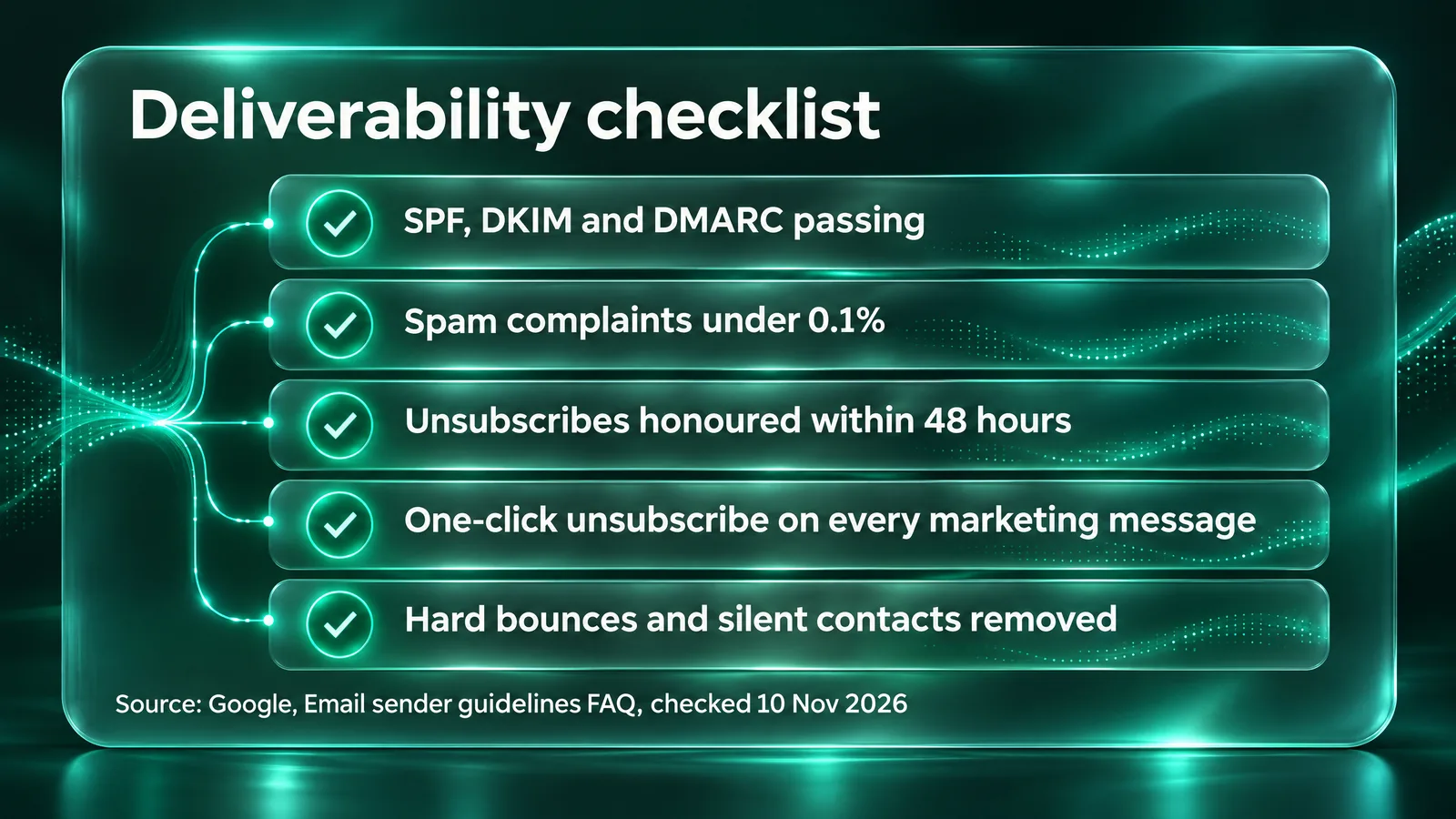
Run this deliverability checklist before any sequence goes live:
| Check | Target |
|---|---|
| SPF, DKIM and DMARC records | All present and passing |
| Spam complaint rate in Google Postmaster Tools | Below 0.1%, never 0.3% or higher |
| Unsubscribe requests | Honoured within 48 hours |
| One-click unsubscribe header | On every marketing message |
| List hygiene | Hard bounces and long-silent contacts removed |
The spam rate and 48-hour figures come from Google's own guidance, which says bulk senders above 0.3% become ineligible for mitigation (Gmail Help, email sender guidelines FAQ).
Open rates are no longer a reliable signal. Apple says Mail Privacy Protection downloads remote content in the background by default, whether or not the reader engages with the email, which registers opens that never happened (Apple, Mail Privacy Protection and privacy).
So segment by engagement using clicks, replies, purchases and site visits. A simple three-way split works for most small lists: engaged in the last 90 days, engaged in the last year, and silent. Mail the silent group rarely, then remove it.
A behavioural triggers email is sent because of something a person did, not because it is Tuesday. List the moments that matter in your business:
Each trigger should come from your CRM or site, so the data has to be right first. That is where CRM automation earns its keep.
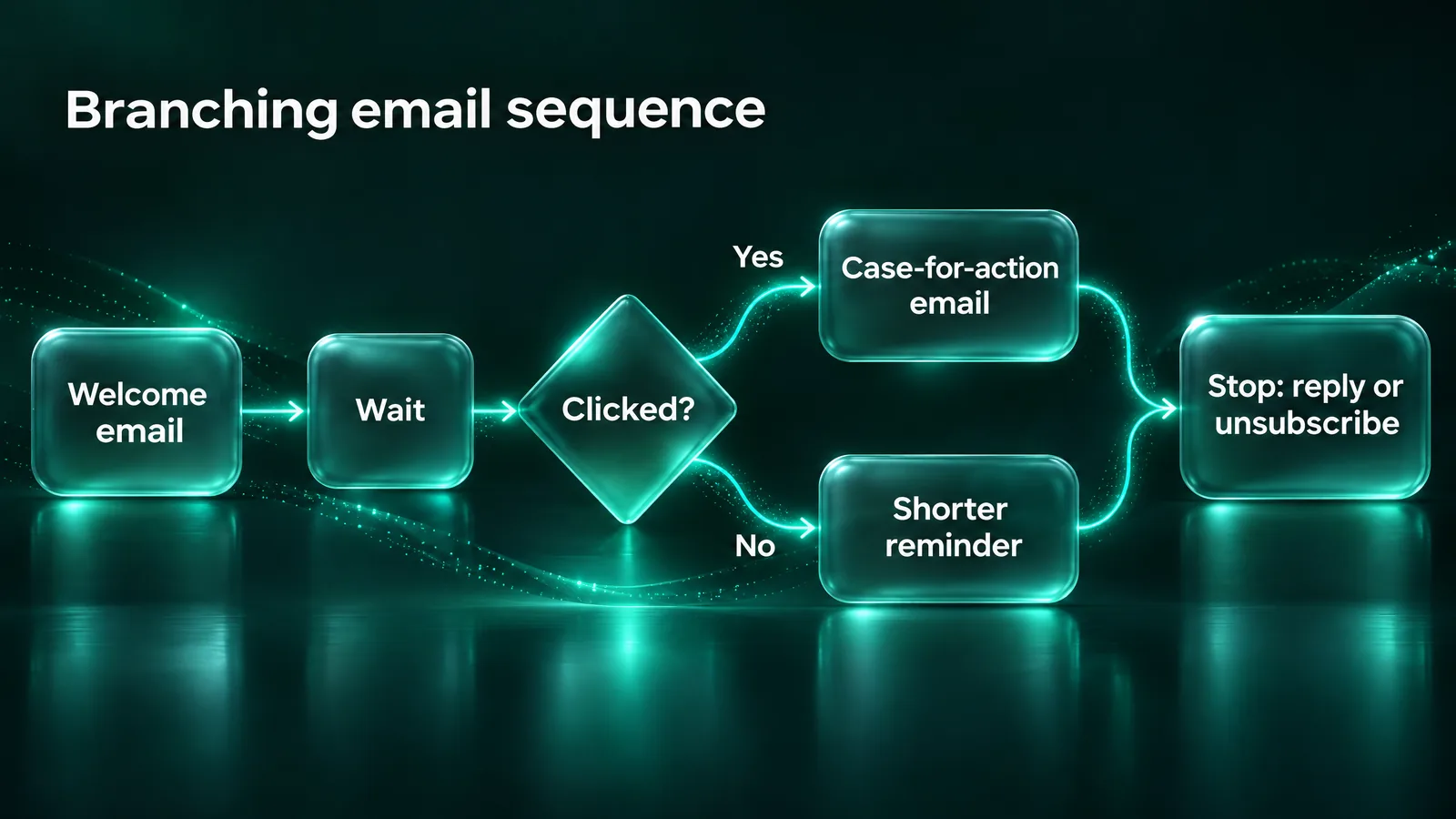
Most platforms include an email sequence builder: Mailchimp, Klaviyo, HubSpot, ActiveCampaign and others. Build each sequence as a branch, not a line. If the reader clicks, they get the next useful thing; if they do not, they get a different angle or nothing.
This is where AI email automation in the UK earns its place: drafting copy in your voice from your past emails, suggesting subject lines, writing variants for testing, and summarising which segment is responding. Keep a person approving anything that goes to customers, at least until the outputs are consistently right.
Avoid letting a model invent offers, prices or claims. Give it a voice guide and a list of things you never say. If you are unsure which tools fit, our free AI tool selector gives a straight recommendation.
Every sequence needs rules for when it ends. Stop the moment somebody replies, books or buys. Stop after an agreed number of attempts. Suppress anyone who unsubscribes for good, in a list that survives the next import.
Then measure what matters: clicks, replies, bookings and revenue. If you are comparing suppliers to run this for you, our guide on how to judge an automation supplier lists the checks to make first.
Put those numbers somewhere you will see them every week.

AI email marketing automation is email that is sent by rules and triggers, with an AI model helping to write, segment and time the messages. The automation decides who gets what and when; the AI helps decide what it says.
You can send marketing email to corporate subscribers, such as limited companies, without consent under PECR, as long as you identify yourself and offer an opt-out. Sole traders and some partnerships are treated as individuals, so you need consent or the soft opt-in for them.
The DMA's 2025 benchmark reported an average UK open rate of 35.9% for 2024. Treat open rates with caution, because Apple Mail Privacy Protection loads emails in the background and registers opens that did not happen.
Yes. Google requires all three for anyone sending 5,000 or more messages a day to Gmail accounts, and every major inbox provider checks them. Smaller senders should set them up anyway to protect deliverability.
Group contacts by recent clicks, replies, purchases and site visits rather than opens. A simple split is engaged in the last 90 days, engaged in the last year, and silent, with the silent group mailed rarely and then removed.
No. AI is useful for drafts, subject lines and variants, but a person should approve what goes to customers. Give the model a voice guide and a list of claims it must never make.
What this site collects, what we hold if we contacted you about our services, how long each part is kept, and how to get it removed. Last updated 10 November 2026.
CADRAL AI LTD, registered in England and Wales, company number 17376948. Contact: umer@cadral.co.uk.
Very little, and each part of the site collects something different.
Using the free tools: nothing. Every calculator and checker on this site runs in your browser on the numbers you type in. Nothing you enter is sent to us or saved anywhere.
Sending an enquiry: your name, your email address and whatever you choose to write, so that we can reply.
Booking a meeting: the booking itself runs through Cal.com, so whatever you enter there, your name, your email, any notes, goes to Cal.com as well as to us.
Emailing or calling directly: whatever you choose to tell us.
Analytics and advertising: Google Analytics and Google Ads, loaded through Google Tag Manager. They tell us which pages get read, which tools get used, where people arrive from, and whether an advert led to an enquiry.
None of it loads until you say so. Everything starts switched off. The banner you saw on your first visit is the only thing that turns it on, rejecting is one click and exactly as easy as accepting, and the single thing stored before you choose is the choice itself. You can change it whenever you like, using the button below. That choice does not cover Leadfeeder, which runs on every visit and is described below.
Company recognition on every visit: Leadfeeder, from Dealfront, runs on every visit and uses the IP address to show us which company is visiting, not which person. The detail is in its own section.
Company recognition, only if you choose it: if you accept it on the cookie banner, ColdIQ's Visitor ID service tells us which company is visiting this site. What it collects, who receives it and how to switch it off again are in its own section and in the cookie policy.
Page counts: our hosting provider, Vercel, counts page views without cookies and without storing anything that identifies you. We use the totals, for example how many times the free tools were opened, and nothing else.
Asking the assistant: the “Ask us anything” button opens an automated assistant run by ElevenLabs. Nothing loads until you press it. Once you do, what you type or say is sent to ElevenLabs and to the AI model that writes the reply, and if you ask about a product we do not know, the assistant runs one web search with your question through a search provider on our server. Transcripts are kept by ElevenLabs for ninety days and then deleted; your voice is not recorded. It says it is automated, it never asks for passwords or payment details, and it only asks for a name and an email if you want us to get in touch.
The booking calendar: the calendar on the booking page is hosted by Cal.com, and opening it shares your IP address with them and lets them place cookies on your device. It does not load on its own: you press a button first, and until you do, this paragraph is the only thing on the subject. That is deliberate. It is the reason the sentence above can stay true on every page of this site, including that one.
Passwords or logins to any of your systems. Nothing on this site asks for them.
Your IP address. It is never stored by us. It is shared with Dealfront on every visit, so Leadfeeder can identify the company, as described below. It is also shared with Cal.com once you have opened the calendar, and, if you accept company recognition, with ColdIQ and the suppliers behind it.
Legitimate interest, for replying to an enquiry you sent and for the booking you made. Legitimate interest, too, for identifying the visiting company with Leadfeeder, set out in its section. Consent, for analytics whenever it is running, which you can withdraw at any time from the button on this page. Consent too for company recognition, if you accept it, covering both what it stores on your device and the identification of your visit; the basis for contacting a business we found that way is legitimate interest, set out in its section and the section on being contacted. If we contacted you about our services, the basis is set out in that section.
Enquiries by form, email or phone are kept only for as long as it takes to deal with what you asked, or for as long as we are actually working together.
Bookings are kept by Cal.com under its own policy, and by us for as long as the meeting and anything that follows it needs.
Leadfeeder: the period is in its section.
Company recognition: the periods are in its section.
If we contacted you about our services, the periods are in that section.
Cal.com, for anything booked through it. Hosting and email providers, acting as processors. ElevenLabs, the AI model provider and the search provider, as processors, for anything you put to the assistant. Dealfront, as a processor, for Leadfeeder on every visit. ColdIQ and Knock2, as processors, and Knock2's data partners, for company recognition if you accept it. Nothing is sold, and nothing is shared with advertisers. If we contacted you about our services, the providers involved are described in that section.
What it is. Leadfeeder, from Dealfront Group GmbH of Karlsruhe, Germany, runs on every visit to this site. It uses the IP address to identify the company, not the person. We use it to understand which businesses visit, so we can offer them relevant services. The lawful basis is our legitimate interests.
How long, and how to object. Dealfront keeps website visitor data, including the IP address, for as long as our account with them exists, or until we delete it or ask them to. They do not delete or aggregate it automatically after a set period. After an account is deleted, they say backups keep it for up to 7 days and system logs for up to 60 days. Their explanation is in How long does Leadfeeder keep your data. To object, or to ask us to have a visit deleted, email umer@cadral.co.uk.
What it is. It is off until you switch it on. If you press Accept all on the cookie banner, or tick Visitor identification under Choose what to allow, this site loads a tracking tag from ColdIQ's Visitor ID service. If you reject, or have not chosen, it is not loaded and nothing in this section is happening to you.
What it collects. Your IP address, which pages you open and in what order, how long you stay, the website you came from, any campaign tags on the link you used, your browser and device type, and counts of mouse movements, scrolls, key presses and taps (counts, not what you type). It stores random identifiers in your browser so that it recognises you if you come back. The full list is in the cookie policy.
What it gives us. A match between your visit and a company: its name, website, industry, size and location. For visitors in the United States it may also match a named person at that company from licensed business data, with a job title, work email address and LinkedIn profile. The supplier states that it names individuals only for visitors in the United States and gives company-level information only for visitors elsewhere, including the UK.
Why, and on what basis. To find out which businesses are looking at what we do, so that we can write to the right ones. The lawful basis for the tag itself, meaning storing identifiers on your device, reading them back and identifying your visit, is your consent, which you can withdraw as described below. The lawful basis for contacting a business we found this way is our legitimate interest, on the terms in the section on being contacted: we may email companies, limited liability partnerships, sole traders and partnerships, every email carries a link to unsubscribe, and a person at Cadral reads and approves every message.
Who handles it. Cadral AI Ltd decides why and how it is used. ColdIQ (Cold IQ LLC, United States) sells us the service and provides the address the tag reports to, and Knock2 (Knock 2 AI LLC, New York, United States) supplies the software behind the tag; both act for us as processors. The tag also loads identification technology run by Knock2's data partners, which place their own identifiers on your device and are responsible for their own use of the data under their own privacy notices: Visual Visitor, for every visitor who accepts, and ProspectDesk, for visitors whose IP address is in the United States. These suppliers are outside the UK. ColdIQ's privacy policy says it relies on standard contractual clauses, the UK addendum or other lawful safeguards for transfers, and Knock2 says it applies appropriate safeguards.
How long we keep it. A record of a visit and the company it matched is kept in our ColdIQ account for three months if we never write to that company, and for twelve months after our last message if we do and nobody replies. If someone replies or asks us to stop, the periods in the section on being contacted apply. The identifiers in your browser stay until you switch this off here or clear your browser's site data. The suppliers do not publish their own retention periods, so if you want what they hold about you deleted, ask us, as set out below.
Switching it off. Open Cookie settings in the footer of any page, or use the button above, and press Reject all, or untick Visitor identification and save. The tag is removed, the page reloads so that nothing it started keeps running, and we delete the identifiers it keeps in your browser. If your browser sends the Global Privacy Control signal, the tag does not load its partners' technology and does not try to identify you as a person, even if you accepted.
Deleting what was already collected. Switching it off stops new collection. What was already collected stays with the suppliers until it is deleted, and we treat withdrawing consent as a request to delete it. Email umer@cadral.co.uk, say roughly when you visited and which company or email address we might have matched you to, and we will ask ColdIQ and Knock2 to delete what they hold about you and tell you when that is done.
We sometimes write to people at companies in the UK and the US that we think could use what we do. This section explains what we hold about you if we did, and how to make us stop.
What we hold. Your name, your job title, the company you work for, your work email address, the address of your LinkedIn profile, and one or more dated public facts about your company, such as a job advert on its website or a filing at Companies House, with the links we found them at. If you reply, we keep your reply. If we first noticed your company because someone there visited this site and accepted company recognition, we also hold the pages that visit looked at.
Where it came from. Public company registers such as Companies House, your company's own website, the trade press, your public LinkedIn profile, and business data providers we use to find the right people at a company and to check work email addresses. It can also be a match between a visit to this site and your company, if the visitor accepted company recognition.
Why, and on what basis. To offer our services to businesses they are likely to suit. The lawful basis is our legitimate interest in doing that, which we have weighed against yours in a written assessment. We may contact companies, limited liability partnerships, sole traders and partnerships by email and on LinkedIn. Every email we send carries a link to unsubscribe.
How we do it. A person at Cadral reads and approves every message before it is sent. We contact at most three people at a company. We stop writing to you as soon as you reply, and if someone at your company replies, we pause our messages to the others until we have read it.
If you say “not now” or “no”. If you tell us “not now”, we may get back in touch later. If you say no, or ask us to stop, we will not contact you again.
Who else handles it. The providers that run our systems for us, as processors: our database and hosting providers, the services we use to send and receive LinkedIn messages and email, our data providers, our CRM, and our AI providers, which help us research, draft and sort replies: Anthropic (Claude), and Vercel's AI Gateway with TypeSafe's Jev model, which we use with zero data retention, so the content we send it is not kept. Some of them are based outside the UK, in the European Union and the United States. Ask us and we will tell you which providers hold your details. Nothing is sold, and nothing is shared with advertisers.
How long we keep it. Twelve months after our last message if you do not reply, and three months if we looked at your company but never wrote. If you ask us to stop, we keep a record that you asked, in coded form, so that we never contact you again, and if you also ask us to delete your details, we delete them.
Your choices. Reply “stop” to any message, use the unsubscribe link in any email, or email umer@cadral.co.uk, and we will not contact you again. You can also ask to see what we hold, to have it corrected or deleted, or to have its use restricted, and you can object to its use at any time. If you are unhappy with how we have handled your information, please tell us first at umer@cadral.co.uk; we will acknowledge your complaint within 30 days. You can also complain to the Information Commission, the UK's data protection regulator, at ico.org.uk.
If you ask for it, you give us read-only access to your ad accounts through each platform's own sign-in. We read your campaign settings and results only to write your audit, using the ads software we run for clients, which processes them on our behalf. You can revoke the access in the ad platform whenever you like, and ask us to delete what we read at umer@cadral.co.uk. Anything else new on this site will be described here before it goes live, not after.
You can ask for a copy of your data, ask for it corrected, or ask for it deleted, at umer@cadral.co.uk. If you are unhappy with how we have handled your information, please tell us first at umer@cadral.co.uk; we will acknowledge your complaint within 30 days. You can also complain to the Information Commission at ico.org.uk, the UK regulator for data protection.
These cover this website and its free tools. Client work is governed by its own written agreement. Last updated 11 September 2026.
CADRAL AI LTD, registered in England and Wales, company number 17376948.
Every calculator and checker on this site runs in your browser on the numbers you enter. Use them as often as you like, on your own business or one you advise. Nothing you enter is sent to us or saved.
The assistant behind the “Ask us anything” button is automated. It describes how we work and how a job could be automated; it does not form a contract, and nothing it says is a quote, a guarantee or legal advice. A price is only a price once it is in writing from us.
The free ad account audit on the paid ads page costs nothing and commits you to nothing. You give us read-only access through each ad platform's own sign-in, never a shared password, and you can revoke it whenever you like. The audit is yours to keep, whether you hire us or not.
Booking runs through Cal.com, embedded on this site. Using it means you are also using Cal.com’s own service, so their terms apply to the booking itself.
The output of every free tool is automated arithmetic on your own inputs, given as information. It is not professional advice, and it guarantees no commercial result.
Check anything important before acting on it. If something looks wrong, tell us: that is useful to us too.
Nothing here excludes liability for death or personal injury caused by negligence, or for fraud. Otherwise, liability for use of this website and its free tools is limited to one hundred pounds, because all of them are provided free of charge.
England and Wales.
What this site stores on your device, who sets it, how long it lasts, and how to change your mind. Last updated 22 October 2026.
Nothing optional loads until you choose on the cookie banner. The only thing stored before you choose is the choice itself. Accepting and rejecting are the same size and one click each, and you can change your mind at any time from Cookie settings in the footer of any page.
The law lets us store one thing without asking: the record of your choice, because it exists only to honour that choice. It is used for nothing else.
cadral-consent-v1
Set by: Cadral AI Ltd (this site)
What it is for: Remembers the choice you made on the cookie banner, so we do not ask again on every page and so we know what to switch off. Nothing else is stored under it, no tag reads it, and it never leaves your browser.
Where: Your browser's local storage.
How long: Until you change your choice or clear your browser's site data.
Off until you switch them on, separately. Google acts for us and, for its own purposes, under its own policies.
Google Analytics and Google Ads cookies
Set by: Google, through Google Tag Manager, only if you allow Analytics or Advertising
What it is for: Analytics: which pages get read, which tools get used, where people arrive from. Advertising: whether an advert led to an enquiry, and audiences built from that.
Where: Cookies on cadral.co.uk, including _ga and a _ga_ cookie followed by an identifier.
How long: Names and lifetimes are set by Google, not by us, and can change; Google's own cookie pages list them. Each is set only after the matching switch is on.
Off until you switch it on. It exists to tell us which company is visiting, so that we can write to businesses that may need what we do; the privacy notice has the lawful basis, how long records are kept and how to have them deleted. It is a chain of suppliers, and each is named here: ColdIQ (Cold IQ LLC, United States) sells us the service and provides the address the tag reports to, coldiq.websitevisitors.ai; Knock2 (Knock 2 AI LLC, New York, United States) wrote the software; and Knock2's data partners add their own identification scripts to the page.
What is sent. Your IP address (which any website receives), the address and title of each page, the page you came from, any campaign tags in the link, your browser and device type, your screen size, how long you stay, and counts of mouse movements, scrolls, key presses and taps. Counts, not what you type. It goes to three places: the address ColdIQ provides (coldiq.websitevisitors.ai), Visual Visitor (fe.sitedataprocessing.com) and, for visitors in the United States, ProspectDesk (tag.trovo-tag.com).
What else it reads. The tag looks in your cookies and browser storage for identifiers from the PostHog analytics product and sends any it finds. This site does not use PostHog, so it finds none.
Global Privacy Control. If your browser sends it, the tag does not load its partners' scripts and does not try to identify you as a person, even if you accepted.
cadral_co_uk_coldiq_com_userId / _sessionId / _browserSessionId
Set by: The ColdIQ Visitor ID tag (software by Knock2), only if you allow Visitor identification
What it is for: Random identifiers that let the tag recognise you across pages and if you return. The session one is replaced after ten minutes without activity.
Where: Your browser's local storage.
How long: No expiry. They stay until you switch Visitor identification off here, or clear your browser's site data.
cadral_co_uk_coldiq_com_pageHistory / _sessionStartTime / _sesssionLastUpdate
Set by: The same tag
What it is for: The pages you opened in this visit, when you opened them, and when the visit started and was last active, kept so each report to ColdIQ carries the whole visit.
Where: Your browser's local storage. (The last name is spelled that way in the supplier's code.)
How long: As above.
vv_visitor_id / vv_session_id
Set by: Visual Visitor, one of Knock2's data partners, whose script the tag loads from data.processwebsitedata.com for every visitor who accepts
What it is for: Identify your browser and your visit to that partner's own service, so it can match the visit to a company or person.
Where: Cookies on cadral.co.uk, read and set by that script. Names are as given in the script; the supplier does not publish a description.
How long: Not published by the supplier.
A hidden frame from tag.trovo-tag.com
Set by: ProspectDesk, another of Knock2's data partners, only for visitors whose IP address is in the United States
What it is for: Receives the address of the page you are on, the page you came from and a session identifier, to match the visit to a company or person.
Where: A one-pixel frame added to the page. It may set identifiers of its own on its own domain.
How long: Not published by the supplier.
These descriptions come from reading the suppliers' scripts and published documents on 22 October 2026. The scripts are theirs and can change; we re-check them when this page is next reviewed.
The booking calendar (Cal.com) and the site assistant (ElevenLabs) load nothing until you press their buttons, and are described in the privacy notice.
Use Cookie settings in the footer of any page, or the button above. It opens with what you have now, changes nothing until you save, and withdrawing is as quick as agreeing was. Switching Visitor identification off removes the tag, reloads the page so nothing it started keeps running, and deletes the identifiers listed above that we can reach from this site.
What switching it off cannot do. It cannot recall what was already sent, and it cannot delete cookies or storage that a partner keeps on its own domain. Your browser's site-data controls do the second; the privacy notice explains how to have the first deleted. Browsers also let you block third-party cookies and scripts, and Global Privacy Control, described above, works without visiting this page at all.
umer@cadral.co.uk. The regulator is the Information Commission at ico.org.uk.